NIST on phase detectors and some verification.

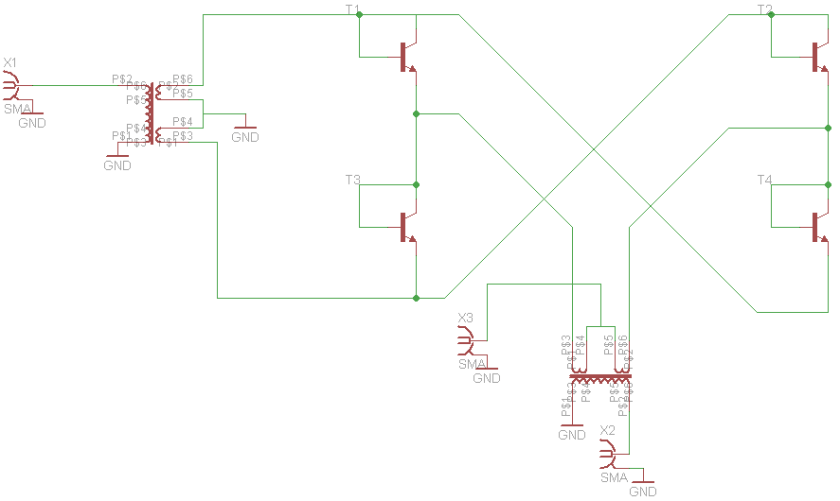
NIST has some interesting articles on their website, one of them being a 5 MHz phase detector with low residual flicker [1] for measuring phase noise.  This spurred some discussions and a series of measurements on my part.

mixer_pd_sch

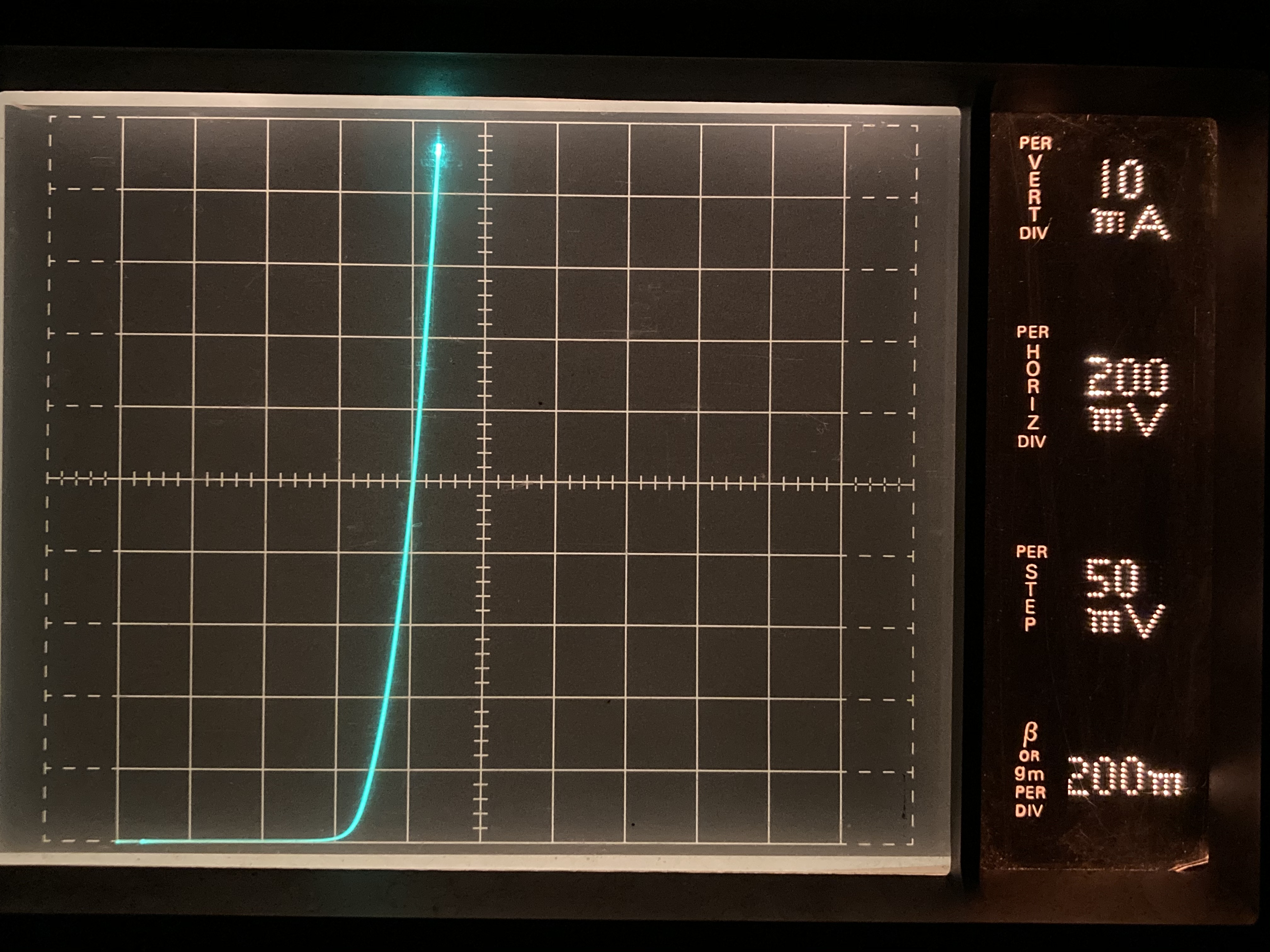
The interesting part is the usage of common 2N2222 transistors.  There have been some discussion on the internet about the outlined connection of the transistor as a diode with the BC junction shorted. Some claiming it behaving as a switch, while others claiming it to be a diode. My own suspicion was that this would act as a diode, and a mixer was built tusing BC547B’s.  A quick look at my crude curve tracer shows the diode action:

ct_diode_bc547

The mixer uses a 5:1 transformer for optimal impedance match, and I was not able to find a pair in my junkbox.  Using FT-2402-43 cores, with a 2t primary, and a bifilar 4.5 turns secondary winding. 4 diode connected transistors and the mixer is working.

Mixing action was verified on a spectrum analyzer before compression points were measured used the 30% am technique.

compression_bc547mixer


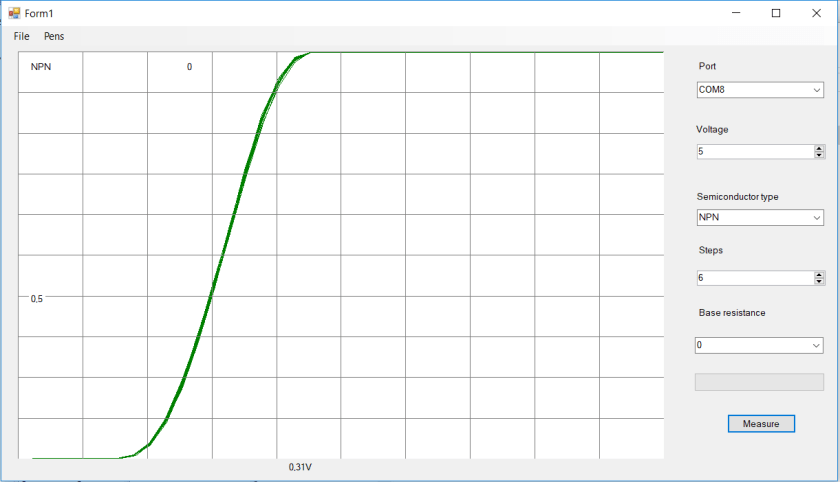
As can be clearly seen, as long as the diodes are conducting, the mixing action is linear.  With the low LO amplitude of 0dBm, the diodes are not conducting properly and that can be shown on the plot of the linearity. Notice that the mixer is in compression with as low as -8dBm input level. The bend and slope with 17dBm LO is somewhat larger than for the lower amplitudes, indicating that the mixer LO may be excessive. Some spectrum analyzer plots showing the IMD products should give further insight into this, if used as a mixer.

nist_mix_spectr

As a last test, I did try to use this phase detector to measure phase noise, using my current setup.  Unfortunately there was little change compared to the much more noisy level 7 mixer it has. This is due to the noise in the low noise amplifier that follows the phase detector and masks any improvement in the phase detector for now.  A new, 100pV/sqrt Hz input noise amplifier is planned.


[1] https://tf.nist.gov/general/pdf/2554.pdf


Note 18 nov 19:

Did a measurement of IL vs LO level at different frequencies:

IL_NIST

Note 22 june 2020:

Installing DokuWiki on Synology

Since it seems a common problem to get DokuWiki to work on Synology NAS, here are some tips:

  1. Before installing go to: “Web Station” and “PHP Settings” then select your PHP version profile.  Under extensions, add “mcrypt” and “openSSL”.
  2. Install DocuWiki.
  3. Run DocuWiki installation setup, make sure to set your needed parameters here.

If you have installed DocuWiki, but not gotten it to work, make sure you remove it in “Packet Center” before adding the extensions.

Happy Wiki’ing.

Cadlab.io

Some time back, I was contacted by someone from cadlab.io, asking if I would like to try it out.

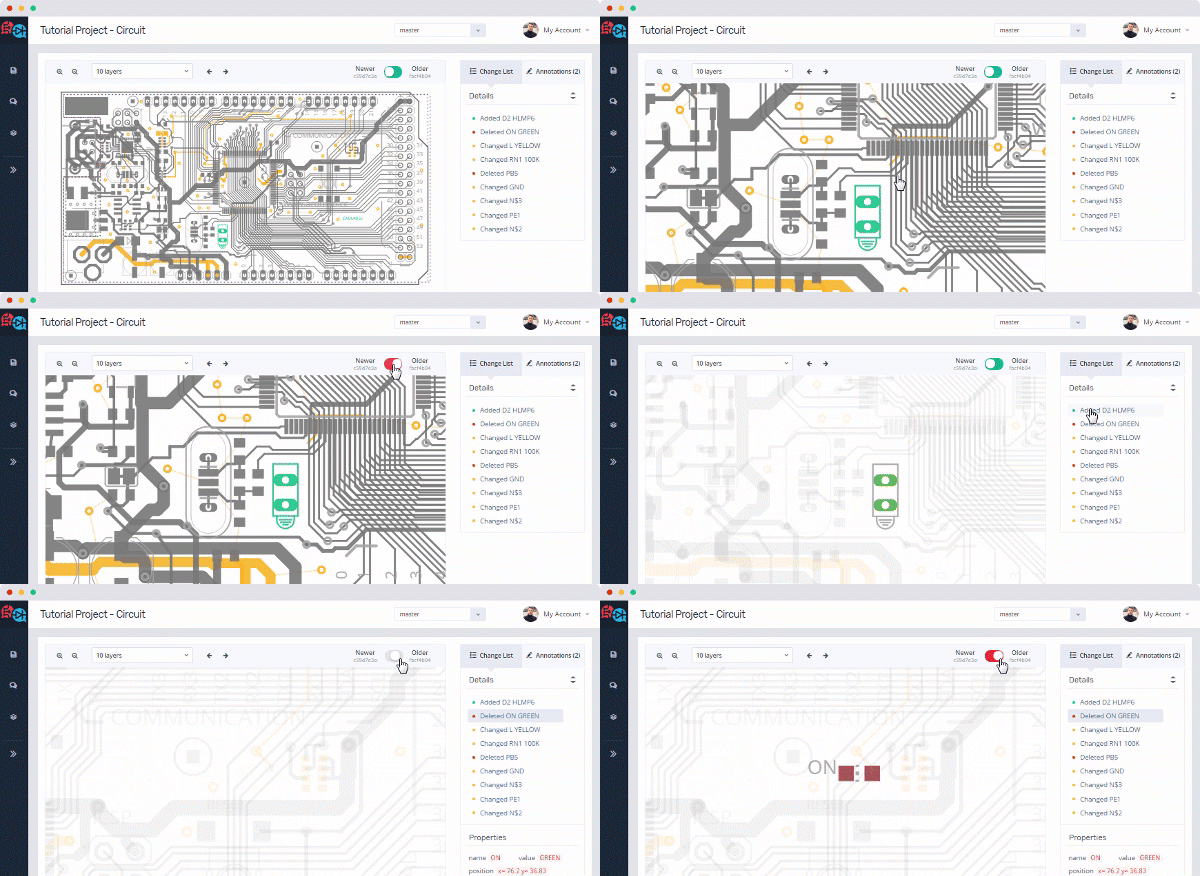
Cadlab.io is a way of providing git with a extension to show Cadsoft Eagle files.

unnamed

As the gif shows, there are ways of comparing the different commits, and showing both PCB layout and schematics.

There is both a free version, and a paid one with private repositories.  It’s a great tool for developing hardware, I just wish that github and the like would adopt it and incorporate it into their platform.

From what I have been able to get out of cadlab, KICAD files should be supported by the end of the year, and Altium may come after that.  For the record, I’m not receiving anything for writing this,  but its appearing as a new, useful tool for making hardware.

Si5351 VFO sketches

Back when Etherkit did come out with its Si5351 boards, I wrote some sketches to use these as VFO’s.  These sketches have been floating around the internet, without being collected at a single place, so thats going to change, in hope that it will reduce the repeating e-mails a bit.

Both sketches work as a basic VFO. It starts at a given frequency, and there is not implemented a method of changing bands. This can be easily added by someone with a little programming experience.  All of these sketches requires NT7S Si5351 library. Please support his development by buying a board.

The encoder used is a regular quadrature encoder (not Graycode, altough using a stepper motor as a graycode encoder should be investigated). There needs to be a couple debouncing capacitors (100nF) over each of the leads from encoder to ground. This should go as close to the encoder as possible. In addition, you may want to add a 22Ω resistor in series with the A and B leads, and another 100nF at the microcontroller side.

There is a RX/TX pin. Put this pin LOW for RX or the VFO will not tune. This is a tune inhibit function, and can be used for locking the tuning while TX.

The sketches are made to work on both AtMega328 and AtMega32U4 boards. There is some preprosessor switches to decide between those 2. If you use a different board, you may need to use a different set of interrupt pins, and some other preprosessor switches.

All of these sketches are provided free of charge, as is, for use by experimenters in non-comercial ways. There is no warranty nor support, altough I may answer some questions…

There exists 2 kinds of versions of the sketch depending on what display you want to use:

16×2 LCD  Display

This is the most common one.

51jy8enJluL


/*
Si5351 VFO
By LA3PNA 27 March 2015
Modified 14 February 2017
Modified 28 November 2018
This code is licenced with GNU GPL v2. Please read: https://www.gnu.org/licenses/old-licenses/gpl-2.0.html
This version uses the new version (v2) of the Si5351 library from NT7S.
see: http://arduino.cc/en/Reference/AttachInterrupt for what pins that have interrupts.
UNO and 328 boards: Encoder on pin 2 and 3. Center pin to GND.
Leonardo: Encoder on pin 0 and 1. Center pin to GND.
100nF from each of the encoder pins to gnd is used to debounce
The pushbutton goes to pin 4 to set the tuning rate.
Pin 5 is the RX/TX pin. Put this pin LOW for RX, open or high for TX.
Single transistor switch to +RX will work.
VFO will NOT tune in TX.
LCD connections:
* LCD RS pin to digital pin 12
* LCD Enable pin to digital pin 11
* LCD D4 pin to digital pin 10
* LCD D5 pin to digital pin 9
* LCD D6 pin to digital pin 8
* LCD D7 pin to digital pin 7
* LCD R/W pin to ground
* LCD VSS pin to ground
* LCD VCC pin to 5V
* 10K pot:
* ends to +5V and ground
* wiper to LCD VO pin (pin 3)
IF frequency is positive for sum product (IF = RF + LO) and negative for diff (IF = RF – LO)
VFO signal output on CLK0, BFO signal on CLK2
ToDo:
*
*/
volatile uint64_t frequency = 7100000; // This will be the frequency it always starts on.
long iffreq = 0; // set the IF frequency in Hz.
long freqstep[] = {50, 100, 500, 1000, 5000, 10000}; // set this to your wanted tuning rate in Hz.
int corr = 10; // this is the correction factor for the Si5351, use calibration sketch to find value.
unsigned int lastReportedPos = 1; // change management
static boolean rotating = false; // debounce management
#include <si5351.h>
#include "Wire.h"
#include <LiquidCrystal.h>
Si5351 si5351;
// interrupt service routine vars
boolean A_set = false;
boolean B_set = false;
LiquidCrystal lcd(12, 11, 10, 9, 8, 7);
#if defined(__AVR_ATmega32U4__) || defined(__AVR_ATmega16U4__)
int encoderPinA = 0; // rigth
int encoderPinB = 1; // left
#endif
#if defined(__AVR_ATmega328P__) || defined(__AVR_ATmega168__)
int encoderPinA = 2; // rigth
int encoderPinB = 3; // left
#endif
int inData;
bool tx;
int txpin = 5;
int freqsteps = 1;
int stepbutton = 4;
#define arraylength (sizeof(freqstep) / sizeof(freqstep[0]))
void setup() {
pinMode(encoderPinA, INPUT);
pinMode(encoderPinB, INPUT);
//pinMode(clearButton, INPUT);
pinMode(stepbutton, INPUT);
pinMode(txpin, INPUT);
digitalWrite(txpin, HIGH);
// turn on pullup resistors
digitalWrite(encoderPinA, HIGH);
digitalWrite(encoderPinB, HIGH);
digitalWrite(stepbutton, HIGH);
#if defined(__AVR_ATmega32U4__) || defined(__AVR_ATmega16U4__)
//Code in here will only be compiled if an Arduino Leonardo is used.
// encoder pin on interrupt 0 (pin 0)
attachInterrupt(1, doEncoderA, CHANGE);
// encoder pin on interrupt 1 (pin 1)
attachInterrupt(0, doEncoderB, CHANGE);
#endif
#if defined(__AVR_ATmega328P__) || defined(__AVR_ATmega168__)
//Code in here will only be compiled if an Arduino Uno (or older) is used.
attachInterrupt(0, doEncoderA, CHANGE);
// encoder pin on interrupt 1 (pin 1)
attachInterrupt(1, doEncoderB, CHANGE);
#endif
si5351.init(SI5351_CRYSTAL_LOAD_8PF, 0, corr);
lcd.begin(16, 2);
lcd.print("Si5351 VFO");
Serial.begin(9600);
delay(2000);
si5351.set_freq(iffreq * 100ULL, SI5351_CLK2);
}
// main loop, work is done by interrupt service routines, this one only prints stuff
void loop() {
tx = digitalRead(txpin);
rotating = true; // reset the debouncer
if ( lastReportedPos != frequency) {
lastReportedPos = frequency;
lcd.setCursor(0, 1);
lcd.print(" ");
lcd.print((long)frequency);
si5351.set_freq((frequency + iffreq) * 100ULL, SI5351_CLK0);
}
delay(50);
if (Serial.available() > 0) // see if incoming serial data:
{
inData = Serial.read(); // read oldest byte in serial buffer:
}
if (inData == 'F') {
frequency = Serial.parseInt();
inData = 0;
}
if (digitalRead(stepbutton) == LOW ) {
delay(150); // delay to debounce
if (digitalRead(stepbutton) == LOW ) {
freqsteps = freqsteps + 1;
Serial.print(freqstep[freqsteps – 1]);
Serial.print(" ");
Serial.print(freqsteps);
Serial.print(" ");
Serial.println(sizeof(freqstep));
if (freqsteps > arraylength – 1 ) {
freqsteps = 0;
}
delay(1000); //delay to avoid many steps at one
}
}
}
// Interrupt on A changing state
void doEncoderA() {
// debounce
if ( rotating ) delay (1); // wait a little until the bouncing is done
// Test transition, did things really change?
if ( digitalRead(encoderPinA) != A_set ) { // debounce once more
A_set = !A_set;
// adjust counter + if A leads B
if ( A_set && !B_set ) {
if (!tx) {
frequency += freqstep[freqsteps]; // hehre is the amount to increase the freq
}
rotating = false; // no more debouncing until loop() hits again
}
}
}
// Interrupt on B changing state, same as A above
void doEncoderB() {
if ( rotating ) delay (1);
if ( digitalRead(encoderPinB) != B_set ) {
B_set = !B_set;
// adjust counter – 1 if B leads A
if ( B_set && !A_set ) {
if (!tx) {
frequency -= freqstep[freqsteps]; // here is the amount to decrease the freq
}
rotating = false;
}
}
}

view raw

Si5351_VFO

hosted with ❤ by GitHub


If you want to use this with I2C 1602 modules:

There is currently no way of using it directly on the Si5351 sketches I have written. I would assume that the modifications to the regular LCD display sketch would not be too hard to do.
Looking at this page:
https://www.sunfounder.com/learn/sensor-kit-v2-0-for-arduino/lesson-1-display-by-i2c-lcd1602-sensor-kit-v2-0-for-arduino.html
Down load the LCD library shown there, you should then be able to
replace the line 58 #include <LiquidCrystal.h> with #include
<LiquidCrystal_I2C.h> and line 64 LiquidCrystal lcd(12, 11, 10, 9, 8,
7); with LiquidCrystal_I2C lcd(0x27,16,2);
I have not tried it, but it should be one way of using those 16×2 I2C displays.


OLED display

There is some nice, small OLEDS around for $3 or so that can be used with a graphics library called U8glib: https://github.com/olikraus/u8glib

CBRj6jXWsAABwJQ


/*
VFO program for Si5351
Using I2C LCD from:
http://www.amazon.com/Huhushop-TM-Serial-Display-Arduino/dp/B00JM88A94/
Si5351 library from NT7S.
Uses the updated version of the library (master).
Updated with the format_freq routine from Tom AK2B
This code is licenced with GNU GPL v2. Please read: https://www.gnu.org/licenses/old-licenses/gpl-2.0.html
Display library is avaible from:
https://code.google.com/p/u8glib/
UNO and 328 boards: Encoder on pin 2 and 3. Center pin to GND.
Leonardo: Encoder on pin 0 and 1. Center pin to GND.
100nF from each of the encoder pins to gnd is used to debounce
The pushbutton goes to pin 6 to set the tuning rate.
Pin 7 is the RX/TX pin. Put this pin LOW for RX, open or high for TX.
Single transistor switch to +RX will work.
VFO will NOT tune in TX.
In serial monitor, you can send "F"+frequency to set frequency. Ex: "F7063000"
IF frequency is positive for sum product (IF = RF + LO) and negative for diff (IF = RF – LO)
VFO signal output on CLK0, BFO signal on CLK2
TODO:
* Write own OLED i2c library with optimizing for text to reduce size of compiled program.
*Add variable tuning resolution
*/
volatile unsigned long frequency = 144400000; // This will be the frequency it always starts on.
long freqstep[] = {50, 100, 500, 1000, 5000, 10000}; // set this to your wanted tuning rate in Hz.
int corr = 120; // this is the correction factor for the Si5351, use calibration sketch to find value.
long iffreq = 0; // set the IF frequency in Hz.
#include "U8glib.h"
U8GLIB_SSD1306_128X32 u8g(U8G_I2C_OPT_NONE); // I2C / TWI
String str;
char b[8];
int inData;
String displayFreq;
boolean A_set = false;
boolean B_set = false;
unsigned int lastReportedPos = 1; // change management
static boolean rotating = false; // debounce management
#include <si5351.h>
#include "Wire.h"
Si5351 si5351;
// int encoderPinA ;
//int encoderPinB;
#if defined(__AVR_ATmega32U4__) || defined(__AVR_ATmega16U4__)
int encoderPinA = 0;
int encoderPinB = 1;
#endif
#if defined(__AVR_ATmega328P__) || defined(__AVR_ATmega168__)
int encoderPinA = 2;
int encoderPinB = 3;
#endif
bool tx;
int txpin = 7;
int freqsteps = 1;
int bandbutton = 6;
#define arraylength (sizeof(freqstep) / sizeof(freqstep[0]))
void setup()
{
// set the encoder to inputs
pinMode(encoderPinA, INPUT);
pinMode(encoderPinB, INPUT);
pinMode(txpin, INPUT);
pinMode(bandbutton, INPUT);
// turn on pullup resistors
digitalWrite(encoderPinA, HIGH);
digitalWrite(encoderPinB, HIGH);
digitalWrite(txpin, HIGH);
digitalWrite(bandbutton, HIGH );
u8g.setFont(u8g_font_courB12);
Serial.begin(9600);
// Initialize the Si5351
// Change the 2nd parameter in init if using a ref osc other
// than 25 MHz
si5351.init(SI5351_CRYSTAL_LOAD_8PF, 0, corr);
si5351.drive_strength(SI5351_CLK0, SI5351_DRIVE_4MA);
si5351.drive_strength(SI5351_CLK2, SI5351_DRIVE_4MA);
// assign default color value
if ( u8g.getMode() == U8G_MODE_R3G3B2 ) {
u8g.setColorIndex(255); // white
}
else if ( u8g.getMode() == U8G_MODE_GRAY2BIT ) {
u8g.setColorIndex(3); // max intensity
}
else if ( u8g.getMode() == U8G_MODE_BW ) {
u8g.setColorIndex(1); // pixel on
}
else if ( u8g.getMode() == U8G_MODE_HICOLOR ) {
u8g.setHiColorByRGB(255, 255, 255);
}
#if defined(__AVR_ATmega32U4__) || defined(__AVR_ATmega16U4__)
encoderPinA = 0;
encoderPinB = 1;
//Code in here will only be compiled if an Arduino Leonardo is used.
// encoder pin on interrupt 2 (pin 0)
attachInterrupt(2, doEncoderA, CHANGE);
// encoder pin on interrupt 3 (pin 1)
attachInterrupt(3, doEncoderB, CHANGE);
#endif
#if defined(__AVR_ATmega328P__) || defined(__AVR_ATmega168__)
encoderPinA = 2;
encoderPinB = 3;
//Code in here will only be compiled if an Arduino Uno (or older) is used.
attachInterrupt(0, doEncoderA, CHANGE);
// encoder pin on interrupt 1 (pin 1)
attachInterrupt(1, doEncoderB, CHANGE);
#endif
si5351.set_freq((iffreq) * 100ULL, SI5351_CLK2);
}
void loop()
{
tx = digitalRead(txpin);
rotating = true; // reset the debouncer
if ( lastReportedPos != frequency) {
lastReportedPos = frequency;
// Serial.print(frequency); // unncomment this to output frequency on change.
si5351.set_freq((frequency + iffreq) * 100ULL, SI5351_CLK0);
}
if (digitalRead(bandbutton) == LOW ) {
delay(150); // delay to debounce
if (digitalRead(bandbutton) == LOW ) {
freqsteps = freqsteps + 1;
Serial.print(freqstep[freqsteps – 1]);
Serial.print(" ");
Serial.print(freqsteps);
Serial.print(" ");
Serial.println(sizeof(freqstep));
if (freqsteps > arraylength – 1 ) {
freqsteps = 0;
}
delay(1000); //delay to avoid many steps at one
}
}
format_freq();
// rebuild the picture after some delay
delay(50);
if (Serial.available() > 0) // see if incoming serial data:
{
inData = Serial.read(); // read oldest byte in serial buffer:
}
if (inData == 'F') {
frequency = Serial.parseInt();
inData = 0;
}
}
// Interrupt on A changing state
void doEncoderA() {
// debounce
if ( rotating ) delay (1); // wait a little until the bouncing is done
// Test transition, did things really change?
if ( digitalRead(encoderPinA) != A_set ) { // debounce once more
A_set = !A_set;
// adjust counter + if A leads B
if ( A_set && !B_set ) {
if (!tx) {
frequency += freqstep[freqsteps]; // hehre is the amount to increase the freq
}
rotating = false; // no more debouncing until loop() hits again
}
}
}
// Interrupt on B changing state, same as A above
void doEncoderB() {
if ( rotating ) delay (1);
if ( digitalRead(encoderPinB) != B_set ) {
B_set = !B_set;
// adjust counter – 1 if B leads A
if ( B_set && !A_set ) {
if (!tx) {
frequency -= freqstep[freqsteps]; // here is the amount to decrease the freq
}
rotating = false;
}
}
}
void format_freq() {
u8g.firstPage();
do {
u8g.setPrintPos(0,15);
uint16_t f, g;
f = frequency / 1000000;
if (f < 10)
u8g.print(' ');
u8g.print(f);
u8g.print('.');
f = (frequency % 1000000) / 1000;
if (f < 100)
u8g.print('0');
if (f < 10)
u8g.print('0');
u8g.print(f);
u8g.print('.');
f = frequency % 1000;
if (f < 100)
u8g.print('0');
if (f < 10)
u8g.print('0');
u8g.print(f);
u8g.setPrintPos(80,32);
u8g.println(freqstep[freqsteps]);
if (tx)
{
u8g.drawStr( 110, 15, "TX" );
}
//draw();
} while ( u8g.nextPage() );
}

view raw

Si5351_i2c_mod

hosted with ❤ by GitHub

This version supports both Arduino Uno with ATMega 328, and Arduino Leonardo with ATMega 32U4.

If you do use this code, please send me a mention, either in the comment or on twitter so other can see what you are doing.

Homemade thermal test chamber

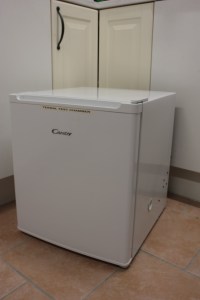
Some time back (2016 timeframe) I built a test chamber out of an inexpensive freezer, after having several project that required taking some thermal data over the expected useable range.  I was looking for a used laboratory freezer that goes down to -60° or lower, but none seems available used.

IMG_1528

The freezer uses “pentane C” cooling media,  and the initial test suggested that before modification, the freezer, with the pump running all the time would go down to -26°C.

After confirming that the freezer would work, it was time to void the warranty. What better way, than by drilling a hole through the side of the freezer?

IMG_1530

I choose to drill through the plastic with a small pilot drill, then poke around to see if there was any cooling tubes in the side. That way I hopefully I would be able to avoid cutting any of the tubes.  Given that I couldn’t feel anything in the foam insulation, it was time for the hole saw.  With a hole through the side of the bottom compartment, a 36mm plastic tube was fitted, some foam spray was used to fix the defects and some clear silicone sealed the gap between the tube and the side of the freezer.

The idea I started with was to make a proper, insulated patch panel, with both coax and DC connectors, but after some thinking, the tube filled with a rag seemed like a more flexible approach.

IMG_1536

Ripping out the thermostat and sensor tube was quite easy, threading the sensor cable for a ready-made 1-wire sensor (got this via bobcatinabox.com some time back). Drilling a hole in the wall of the  small compartment was done by poking through the insulation from the back with a pice of wire, then when confirming it was clear off the cooling tubes and drilling through.

A 12V PTC heater with fan was modified so that the fan can run all the time, and fitted to the shelf. This way there will be constant air circulation inside, and the heater can be controlled by the microcontroller.

On the back of the freezer,  the connector block for the freezer had an unused terminal that was repurposed as a terminal for the live wire that before had gone to the thermostat. A 12V 20A switch mode power supply was added, and fixed to the back wall with a couple M3 screws and nuts.

IMG_1542

A Arduino was fixed above the power supply, and a small pice of wearoboard with some relays and driver transistors to switch the power to the pump motor and to the heater.

The program running on the microcontroller is a fuzzy logic implementation with a 2°C hysteris. There is also some timing logic to not turn on the pump before the back pressure has bled trough, or the fuse will blow.  I started out with some SCR’s but the cheap eBay SCR I bought had too much loss before it caught fire.

The program can be found here: https://github.com/la3pna/thermal-chamber

I intend to implement a proper dual PID for the controller one day, as keeping temperatures within 0.5°C should not be too difficult. Adding network interface in addition to the USB and a propper way of handling those messages would make it more versatile.

There is currently no cap on how hot it can become inside, but I suspect the plastic casing will not take well to having it run at high temperature for long time.

The inside usable size is approx 320x320x180mm, so there is no way of fitting a 19″ rack in there, but for smaller parts, it will do OK.  Now I just need to build the multiple termocouple amplifiers into a box with some method of reading it out.

An example of measured data:

tcxo


Si5351B FM modulation

The Si5351B have an interesting feature in that it can be FM modulated via the VCXO pin. After some discussions with Jason NT7S about the VCXO feature in his last revisions of the Si5351 library we decided I had to try that.

The VCXO pin is DC coupled and swings the crystal frequency a programmed amount to either side of the center frequency. As such, the input should be biased to a given point (VCC/2) and the input AC coupled.

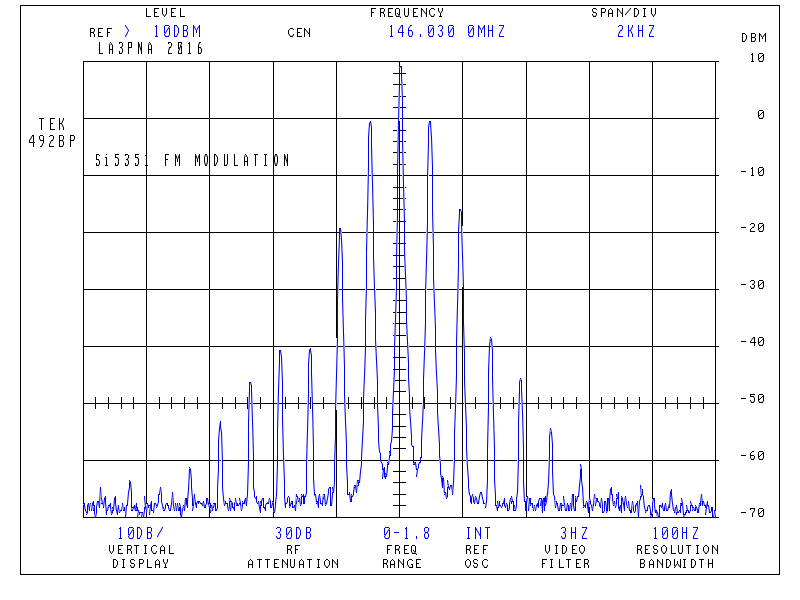
si5351_fm

Points to the first one that can tell what side the sine of the modulation signal are clipping  in the above plot (I should get around to fixing that signal generator).

By modulating with 1KHz and 40PPM pull range, I obtained a deviation of 2.5KHz with 2Vp-p  modulating signal. 5KHz was obtained with 4.3Vp-p. It is quite important to avoid overdriving the input, there will be excessive distortion if the input amplitude is larger than 3Vp-p. In order to obtain 5KHz deviation, a 60PPM pull range should put the needed modulation at less than 3Vp-p.

In addition, the input signal should be filtered, limited and added pre-emphasis.

(This article was written in january 2017, but newer published for some reason.)

Note 28/10-19: If you need a Break out board for the Si5351B try this link.

For the C version. Yes you would have to build it your self.


Si5351 Spurius preformance

As some of you know, I have done a lot of work with the Si5351 series of synthesizers. In a couple of blog post, I will try to document some of the more subtile details of operation of this chip. Since I don’t have access to the actual mask sets for the chips some of these statements are qualified guessing, based on observations by NT7S and myself.

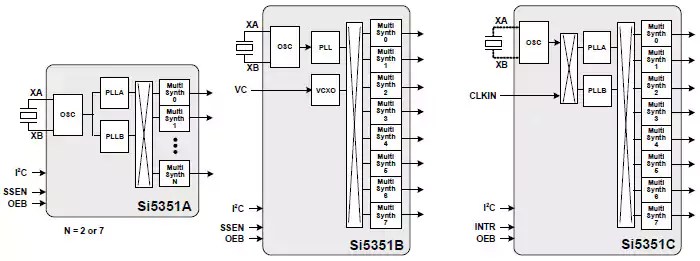
I believe the routing in the chip to be more complicated than outlined in the datasheet. Trying to determine where the spurious responses come from, and why they have their amplitudes have shown some of the internals that I will try to outline. Lets start with the block diagram, shamelessly stolen from SiLabs:

si5351abc_block

The Synthesizer consists of a crystal oscillator (or TCXO/OCXO) with drivers. The performance of this is depending on the signal quality. A good designed crystal oscillator with a limiter will outperform the internal oscillator on phase noise.  Notice that the C version has a switching matrix after the oscillator and the option to feed in an external clock. This is a nice option for those cheap OCXO’s that are on non-integer frequencies.

A bit interesting is it that the datasheet mentions 25MHz and 27MHz as the alternative frequencies, but the chip works on a broad range. That 26MHz crystal will work just fine. I do believe the input frequency are divided down to  5MHz, before being distributed internally. This would then be routed out to PLL A and B, microcontroller (for the I2C) and probably to the multisynth stages as a clock.

There are both internal and external capacitors to the device. A interesting point is that when using regular crystals the spurious products seems to be reduced when selecting the internal capacitors, unlike loading with external capacitors.

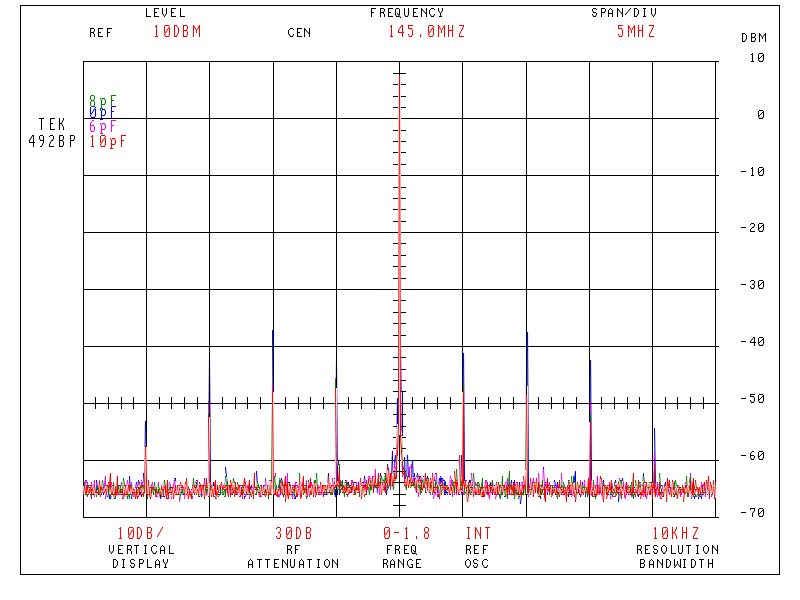
overlay_si5351b2

The above picture is taken with PLL A set to 870MHz and the multisynth set to 6. There is up to 10dB difference between the 0pF (blue plot) and 10pF (red plot), using the internal capacitors. Selecting the 0pF internal capacitor, and using external 18pF, lead to a 10dB increase in spurs above what can be seen above. I should point out that while there are some spurs, they are not a deal breaker in this case, the above spurs can easily be removed by bandpass filtering if necessary.

The PLL’s seems to be a fairly common design, with a PLL bandwidth of around 200KHz (there are some subtile spurs). The PLL operates over the range 600MHz-900MHz. This part is the well-behaved part of the chip.

The “Multisynth” is the unknown part of the chip. I believe this is some kind of fractional divider,  clocked by the PLL signal and the 5MHz internal clock. The output spurs are reduced when the divider is operated at integer divisions instead of fractional divisions. Some experiments suggest that the multisynth is followed by a divide-by-2, as the output always have a 50% duty cycle square wave.

The way to get the best performance is to lock the Multisynth at a suitable integer level, and move the PLL to do the frequency change.  The output should be used with a switching type mixer (DBM with diodes in saturation or switches) in order to get the best preformance. A good limiter could reduce the spurious responses, perhaps reducing the voltage to the output buffer would help in driving them deeper into saturation, and giving better limiting action?

ADDITION 31. dec 16: The above plot is the worst case I have been able to make by abusing the Si5351. This is not at all typical performance. The 200KHz spurs is usually found at an amplitude less than -110dBc, and other spurious products should be below -70dBc. In my opinion, the chip is well suited as local oscillator in a receiver. 

Mitsubishi MOSFET VHF hybrids

Observe that Mitsubishi has EOL’ed (End Of Life) most of  their MOSFET range as of Jan 1. 2019

The last 15 years there have been a large development in MOS hybrid preformance, combined with a reduction in price, making these hybrid amplifiers quite a reasonable choice for a power amplifier in a VHF or UHF transceiver.

This hybrid is the Mitsubishi RA07H0608M made for the 60-88MHz range. I have been using these for experiments in the 70MHz band with both linear modes and FM. This hybrid should work on 50MHz, but determining the optimal bias point for linear would require the ability to do 2-tone testing.

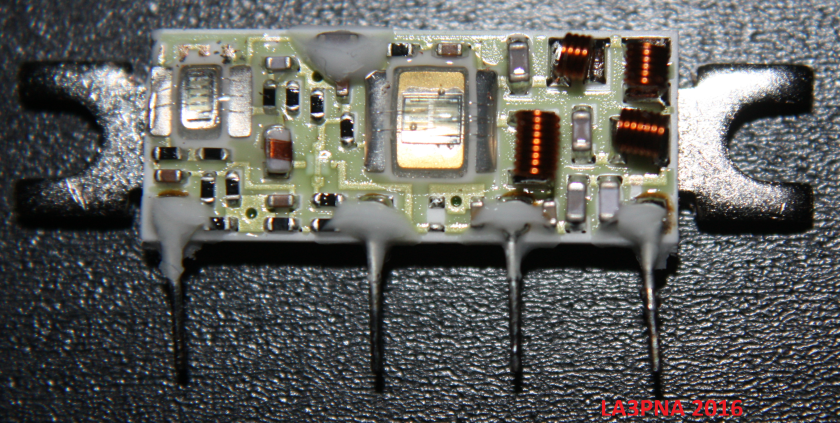
I managed to burn out one of the amplifier modules due to self oscilations, and wanted to do some reverse engineering of what’s in the hybrid.

This hybrid is  a thick film hybrid with 2 MOSFET dies, one for the PA and one for the driver in addition to biasing and impedance maching components. The white goop is probably non-acidic sillicone used to attach the plastic casing to the substrate and cooling tab.

module.png


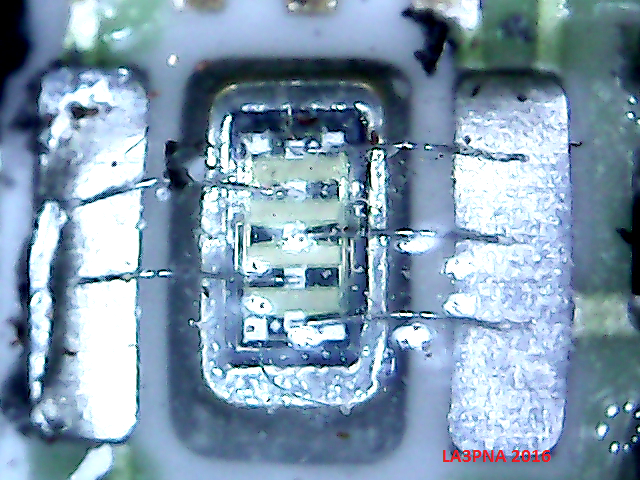
The driver amplifier is a vertical MOS die, approximately 1mm x 2mm in size and with 2 bond wires to the base, and 3 to the drain.

driver_transistor

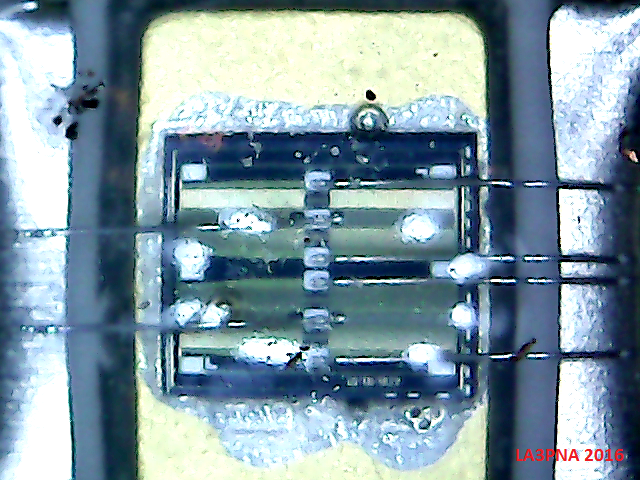
The PA transistor is a fairly large vertical MOS device, with 2 clearly visible trenches and several bonding wires on the drain. This is to reduce the inductance in the bonding wire and carry enough current. The die is quite large, approx 3mm x 3mm in size. There are some interconnections on the top of the die, but due to the passivation and sillicone around the die, its difficult to see the connections clearly.

PA_transistor.png

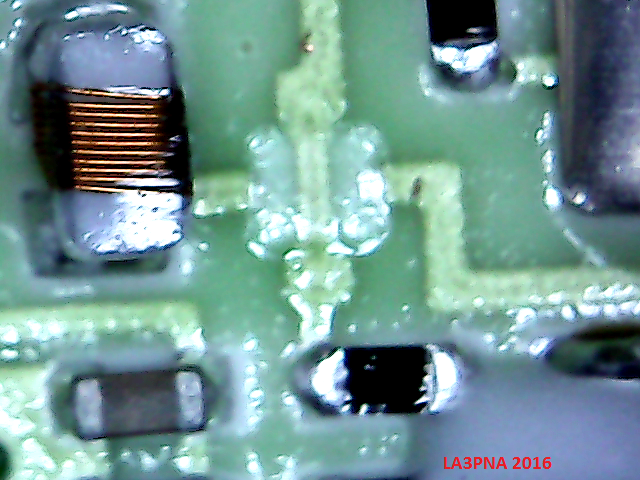
A interesting thing is how one pass wires over antother. The hybrid consists of  a ceramic base (called substrate), with a groundplane on the backside that are bonded to the cooling tab. Traces is then put on the top of the ceramic substrate and fused together by firing. In order to make a wire pass over another, the  bottom wire is laid down and fired (heated in a furnace to a given temperature), then a isolating layer is laid down and fired before the other trace is laid down and fired. This is done because there is only one layer avaible to put traces on, and having extra wire connections to the hybrid is expensive. The opague isolator as shown are probably BeO, although the datasheet don’t mention that there is BeO in the device. BeO dust is toxic.

The traces shown here is  the bias line to the PA FET passing over the drain supply to the driver FET.

pa_pass.png

Another interesting thing about this hybrids are the extensive use of 0402 and 0603 resistors and capacitors. With thick film hybrids, its quite possible to put the resistors directly on the substrate. A reason to not do that in a amplifier like this may be that the resistors will have a termal gradient and that the resistors would require expensive laser trimming.  High value capacitors like those used for decoupling are hard to make on a hybrid like this, so soldering in regular SMD components, and even electrolytics some times.

The PA FET has negative feedback to reduce gain and improve stability, while I could not see any for the driver. There seems to be some damage to my module there, could I have blown that off the hybrid? The increase in drive level by adding some light feedback to the driver may be worth a experiment.

The output and input matching looks to be of the lowpass kind, and on the output there are some harmonic supression. The RF design here clearly outperforms the mechanical and cooling. Interfacing these modules into circuits that once held older bipolar hybrids may not be straigth forward. There is a lot of gain to several GHz avaible in the FET’s and the grounding needs to be good to avoid oscillations.

Overall, the reverse engineering of these modules were quite interesting.  A interesting thing to do may be to trace out the shcematic, although it should look like most any of the other modules available. Curve tracing the FET could be interesting to determine their parameters.

A notch filter for phase noise measurment

Measuring phase noise is difficult, due to the large difference between the signal and the noise.  Here I will outline the method I use to determine the noise of a oscillator and show the basic bandpass – notch filter used to reduce the carrier level to a level that the common spectrum analyzer can handle.   The filter shown here will be made for 9MHz, but other frequencies can be realized as long as high Q matched crystals can be found.

When doing these measurements, reducing the noise figure of the spectrum analyzer, and knowing the inserted gain is important. I use a module with a ERA-2 MMIC mounted in a die cast box with extended filtering on the DC input.

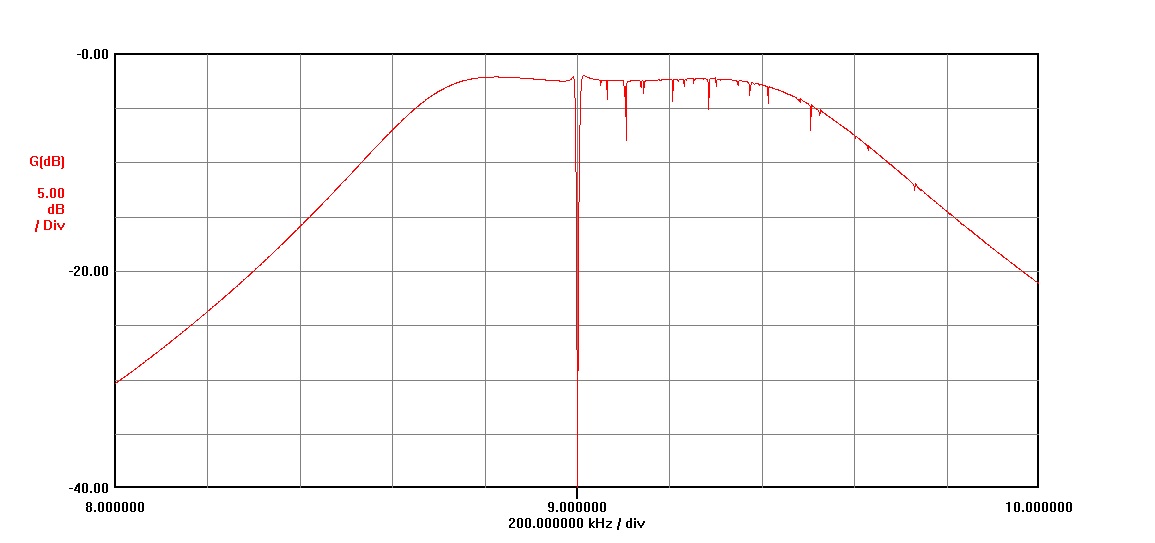
The filter module start with a QTC (Quad Tuned Circuit) mixed form bandpass filter.  This is built and tuned for a flat bandpass before the notch

QTC_9MHz

After the filter is built and tuned the crystals are connected over the 2 resonators in center and the filter is adjusted to have a as flat as possible passband. This way, with crystals matched as close as possible (2Hz) the notch depth should be better than 80dB. If the crystals can’t be matched, then a trim capacitor can be placed in series with the crystal, but this makes the tuning of the notch depth much more difficult.

QTC_9MHz_notch

The obtained filter does not need to have the notch in the center of the passband. the 3dB points of the filter will be what limits the bandwith of your measurement. If the crystals have high Q and no spurious responces (mine had some) then the passband should be flat. If there is some spurious responces, you can average it out on most spectrum analyzers. Knowing the width of the notch at the 3dB point determines how close to the carrier you can measure the phase noise.

notchfilter

To use the filter with a spectrum analyzer, you add a low noise amplifier with known gain at the frequency you operate on between the filter and the spectrum analyzer. Add a variable attenuator in front of the filter and set this to max attenuation before connecting it to the signal source.

Tune the signal source to the frequency where it is attenuated the most by the filter and reduce the attenuation to 0. If The noise level around the notch should be somewhat higher than the attenuated carrier.

If the spectrum analyzer have a marker that can show the amplitude level in dBm/Hz then the level of the phase noise in dBc is: Source output power(dBm) + noise amplitude (dBm) + (loss through filter in dB) – (amplifier gain in dB). For example, lets assume my source is at 10dBm, the measured noise level at -115dBm,  2.4dB filter loss and 20dB gain:  10dBm + (-115dBm/hz) + (-2.4dB) –  (20dB) = -127dBc/Hz phase noise.

If the analyzer does not have a marker function then you need to know the bandwith of the IF filter in the analyzer in addition to the parameters above.  The total equation would then be: Source output power(dBm) + noise amplitude (dBm) + (loss through filter) – (amplifier gain) – 20*log(analyzer bandwith in Hz ).   For example, source at 10dBm, measured noise level at -105dBbm in 100Hz bandwith, 2.4dB filter loss and 20dB gain: 10dBm + (-95dBm) +(-2.4dB) – (20dB) -(20*log(100)) = -147dB/Hz phase noise.

block_phasenoise

Accurate noise measurements are not easy to do. Careful evaluation of all used components and careful measurements with averaging of the traces helps to obtain accurate measurements. Alternative methods use phasing or PLL methods, and have better accuracy over a larger bandwidth, at the expence of a more advanced measurement setup.

Update 1.th February 2015:

Did a measurement of the HP8656B signal generator using the notch filter and a ERA-2 amplifier with 15.7dB gain:

notchfilter_9MHz_HP8656B


The input signal into the notch filter were 0dBm and the notch filter loss 2.4dB. The total equation will then be: 0 +(-106.1dBm/Hz) + (-2.4dB) -15.7dB = -124.2dBc/Hz at the point 10KHz offset from the carrier.  This value corresponds well with other methods used to measure the phase noise on this generator. The value is 10dB better than the than what the datasheet states as worst case phase noise, not uncommon for HP equipment from the 1980s era.